このセクションでは、MINTOの内部構造と主要なコンポーネントについて説明します。これにより、MINTOがどのように動作するかを理解し、より高度な使用方法やカスタマイズが可能になります。
QuickStartでは、MINTOの基本的な使用方法について説明しました。まずはExperiment.runsから取得できるそれぞれの記録を表すDataStoreオブジェクトについて説明します。
まずはQuickStartと同じ数値実験用のコードを用意して実行しましょう。
import ommx_pyscipopt_adapter as scip_ad
from ommx.dataset import miplib2017

import minto

instance_name = "reblock115"
instance = miplib2017(instance_name)

timelimit_list = [0.1, 0.5, 1, 2]

experiment = minto.Experiment(
    "quickstart_example",
    auto_saving=False,  # True is recommended, but set to False for demonstration
    verbose_logging=False,  # True is recommended, but set to False for demonstration
)

adapter = scip_ad.OMMXPySCIPOptAdapter(instance)
scip_model = adapter.solver_input

for timelimit in timelimit_list:
    with experiment.run() as run:
        run.log_parameter("timelimit", timelimit)

        scip_model.setParam("limits/time", timelimit)
        scip_model.optimize()
        solution = adapter.decode(scip_model)

run.log_solution(solution)experiment.runsには複数のDataStoreオブジェクトが格納されています。各DataStoreオブジェクトは、特定の実験実行に関連するデータを保持しています。例えば、以下のようにアクセスできます。
experiment.runsDataStoreオブジェクトは
@dataclass
class DataStore:
    problems: dict[str, jm.Problem]
    instances: dict[str, ommx.v1.Instance]
    solutions: dict[str, ommx.v1.Solution]
    objects: dict[str, dict]
    parameters: dict[str, int | float | str]
metadata: dict[str, Any]のように定義されていて、run.log_*メソッドで保存されたデータはそれぞれ対応する属性に格納されます。例えば、run.log_problem("my_problem", problem)で保存された問題はDataStore.problems["my_problem"]でアクセスできます。
Two spaces Data storage
MINTOのデータ保存は2つのspaceで構成されています。1つ目はExperiment spaceで、2つ目は各runspaceです。
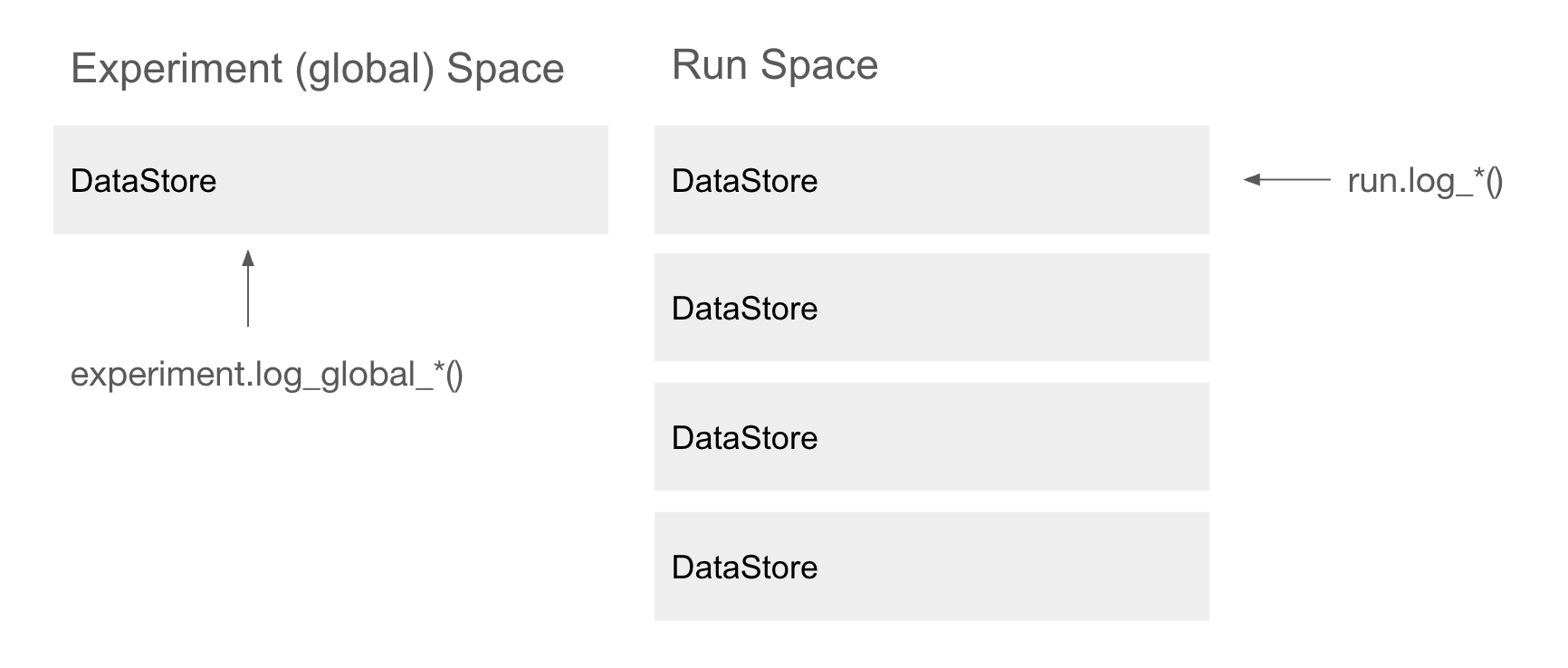
runspaceのデータの保存は上記で見てきました。.runsでアクセスできるDataStoreのリストに格納されています。
experiment.dataspace.experiment_datastore数理最適化ではインスタンスやモデルを固定してソルバーのパラメータを変更しながら行ったり、モデルに含まれるパラメータを変更してsweepするなどの実験を行います。
そのときに実験中に固定となる数理モデルやインスタンスは固定したいことが多いです。またインスタンスは非常に大きなデータになるため、各runに同じインスタンスデータを保存するのは非効率です。
そのため、MINTOではExperimentレベルで固定データを保存する仕組みを提供しています。Experimentレベルのデータはexperiment.dataspace.experiment_datastoreでアクセスできます。
Experimentレベルへのデータの保存はexperiment.log_global_*メソッドで行います。例えば、数理モデルやインスタンスを保存する場合は以下のようにします。
experiment.log_global_instance(instance_name, instance)experiment.dataspace.experiment_datastore.instances["reblock115"]またExperimentレベルのDataStoreもDataFrameで取得することができます。しかしExperimentレベルの場合はDataStoreのattributeごとにdataframeが生成されるため.get_experimenta_tables()の返り値はdict[str, pandas.DataFrame]であることに注意してください。
例えば以下のように使用します。
experiment.get_experiment_tables()["instance"]まとめ
mintoでは2つのspaceを用いてデータを効率的に管理する仕組みを提供しています。
このセクションまで把握すればmintoのコアを理解したと言って良いです。
逆に言えばmintoはこの2つのspaceにデータを保存する以上の複雑なことはしておらず、シンプルな管理機能を提供することで数理最適化におけるデータ管理を容易にすることを目指しています。
このあとのチュートリアルは2つのspaceを操作したり、mintoで管理したデータを他の人と共有したりなどさらに使いやすくするためのutilsを紹介していきます。