
Ad Campaign Optimization with Black-Box Optimization#
🌐 日本語 | English
Let’s optimize ad campaign delivery using black-box optimization. In ad delivery, we tune parameters such as the following:
Bidding strategy (CPC, CPM, CPA, ROAS)
Targeting granularity (gender only, age group, detailed demographics, behavioral history)
Target devices (PC, mobile, tablet, all devices)
Delivery time slot (all day, weekday daytime, night, weekend)
Creative format (banner, video, native, rich media)
Frequency cap (no limit, 3 per day, 5 per week, 10 per month)
Audience strategy (lookalike, retargeting, interest-based, new acquisition)
Budget allocation
Bid amount
Target age range
Here we optimize ad delivery using a simulator provided for this tutorial.
The simulator takes the parameters above as input and outputs:
CTR (Click Through Rate)
CVR (Conversion Rate)
CPC (Cost Per Click)
CPA (Cost Per Acquisition)
ROAS (Return on Ad Spend)
Internally, the simulator accounts for interactions such as:
the synergy of mobile × behavioral targeting
the high conversion of video × retargeting
the time-of-day effect of evening × mobile
the optimization effect of CPA bidding × behavioral targeting
First, let’s simply try the simulator.
JijZept Tools provides several demo simulators in jijzepttools.blackbox_optimization.demo. We import the ad-delivery simulator from there.
import jijzepttools.blackbox_optimization.demo.ad_simulator as ad_sim
Trying the ad-delivery simulator#
First, let’s set the market parameters — the conditions that we cannot control.
# Market environment settings
market = ad_sim.MarketConditions(
    competition_level=0.7,
    market_saturation=0.4,
    seasonal_factor=1.2,
    economic_index=1.1,
)
Next, set the parameters corresponding to the ad-delivery strategy. These parameters are the input to the simulator.
ad_sim_params = ad_sim.AdCampaignParams(
    bidding_strategy=ad_sim.BiddingStrategy.CPC,
    targeting_granularity=ad_sim.TargetingGranularity.AGE_GROUP,
    device_target=ad_sim.DeviceTarget.ALL_DEVICES,
    time_slot=ad_sim.TimeSlot.ALL_DAY,
    creative_format=ad_sim.CreativeFormat.BANNER,
    frequency_cap=ad_sim.FrequencyCap.DAILY_3,
    audience_strategy=ad_sim.AudienceStrategy.INTEREST,
    budget_allocation=1.0,
    bid_amount=150,
    target_age_range=30,
)
Pass these parameters to the runner and run the simulator.
runner = ad_sim.AdCampaignRunner(market_conditions=market)
result = runner.analyze_campaign(ad_sim_params)
result
{'ctr': np.float64(0.01320148047315424),
 'cvr': np.float64(0.034780468250565445),
 'cpc': np.float64(135.83788652481957),
 'cpa': np.float64(3905.5795783488675),
 'roas': np.float64(0.025604394429539764),
 'total_score': np.float64(0.254137059895093),
 'constraints_satisfied': True,
 'constraint_violations': []}
Now let’s build a black-box function that uses this simulator. The black-box functions supported by JijZept Tools receive a dict[str, str | float], so we need to implement a conversion to the Enums to match the runner’s interface.
def ad_campaign_blackbox_func(params: dict):
    ad_params = ad_sim.AdCampaignParams(
        bidding_strategy=ad_sim.BiddingStrategy(params["bidding_strategy"]),
        targeting_granularity=ad_sim.TargetingGranularity(
            params["targeting_granularity"]
        ),
        device_target=ad_sim.DeviceTarget(params["device_target"]),
        time_slot=ad_sim.TimeSlot(params["time_slot"]),
        creative_format=ad_sim.CreativeFormat(params["creative_format"]),
        frequency_cap=ad_sim.FrequencyCap(params["frequency_cap"]),
        audience_strategy=ad_sim.AudienceStrategy(params["audience_strategy"]),
        budget_allocation=params["budget_allocation"],
        bid_amount=params["bid_amount"],
        target_age_range=params["target_age_range"],
    )
    return runner.analyze_campaign(ad_params)
Black-box optimization#
Setting up the decision variables#
JijZept Tools provides the jijzepttools.blackbox_optimization module for black-box optimization. First, create a BlackboxProblem object and set up the decision variables.
Four kinds of variables are available:
Binary: 0 or 1
Categorical: set a list of strings as the categories, one of which is selected
Integer: int
Continuous: float
Use the .add_* methods to add decision variables. Each .add_* method returns a JijModeling decision-variable object, which you can use later to add constraints. For now, let’s set up the decision variables without adding any such constraints.
from jijzepttools.blackbox_optimization.bbo_ommx import BlackboxProblem
import jijmodeling as jm

bb_model = BlackboxProblem(
    "ad opt", description="ad campaign optimization", sense=jm.ProblemSense.MAXIMIZE
)

bidding_strategy = bb_model.add_categorical_var(
    "bidding_strategy", ["CPC", "CPA", "CPM"]
)
targeting_granularity = bb_model.add_categorical_var(
    "targeting_granularity", ["age_group", "detailed_demo", "gender_only", "behavioral"]
)
bb_model.add_categorical_var("device_target", ["all_devices", "mobile", "pc", "tablet"])
bb_model.add_categorical_var(
    "time_slot", ["all_day", "evening", "weekday_daytime", "weekend"]
)
creative_format = bb_model.add_categorical_var(
    "creative_format", ["banner", "video", "native", "rich_media"]
)
bb_model.add_categorical_var("frequency_cap", ["daily_3", "weekly_5", "no_limit"])
bb_model.add_categorical_var(
    "audience_strategy", ["interest", "retargeting", "new_acquisition"]
)
budget_allocation = bb_model.add_continuous_var("budget_allocation", 0.1, 2.0)
bb_model.add_integer_var("bid_amount", 50, 500)
bb_model.add_integer_var("target_age_range", 10, 50)

bb_model.decision_variables_table()
/home/runner/work/JijZeptTools/JijZeptTools/.venv/lib/python3.10/site-packages/myfm/__init__.py:1: UserWarning: pkg_resources is deprecated as an API. See https://setuptools.pypa.io/en/latest/pkg_resources.html. The pkg_resources package is slated for removal as early as 2025-11-30. Refrain from using this package or pin to Setuptools<81.
  from pkg_resources import DistributionNotFound, get_distribution  # type: ignore
| name | type | lower_bound | upper_bound | categories | description | step | |
|---|---|---|---|---|---|---|---|
| 0 | bidding_strategy | Categorical | 0 | 2 | [CPC, CPA, CPM] | NaN | |
| 1 | targeting_granularity | Categorical | 0 | 3 | [age_group, detailed_demo, gender_only, behavi... | NaN | |
| 2 | device_target | Categorical | 0 | 3 | [all_devices, mobile, pc, tablet] | NaN | |
| 3 | time_slot | Categorical | 0 | 3 | [all_day, evening, weekday_daytime, weekend] | NaN | |
| 4 | creative_format | Categorical | 0 | 3 | [banner, video, native, rich_media] | NaN | |
| 5 | frequency_cap | Categorical | 0 | 2 | [daily_3, weekly_5, no_limit] | NaN | |
| 6 | audience_strategy | Categorical | 0 | 2 | [interest, retargeting, new_acquisition] | NaN | |
| 7 | budget_allocation | Continuous | 0.1 | 2 | NaN | NaN | |
| 8 | bid_amount | Integer | 50 | 500 | None | 1.0 | |
| 9 | target_age_range | Integer | 10 | 50 | None | 1.0 |
Setting up the initial dataset#
BlackboxProblem has a random_candidates method for generating random data. We use it to generate the initial dataset, which is used as the starting point of the black-box optimization.
In practice, the initial dataset is often built from past records, but here we generate it randomly.
# Generate random samples
init_dataset = bb_model.random_candidates(num_samples=4)

# Evaluate each sample
init_evals = [ad_campaign_blackbox_func(d) for d in init_dataset]
Next, let’s prepare a BlackboxOptimization object.
BlackboxOptimization takes a BlackboxProblem. While BlackboxProblem is the class for configuring the model (such as setting up the decision variables), BlackboxOptimization is the class that manages the algorithm side, which actually performs the black-box optimization.
Also, before calling .run, you must call .setup on BlackboxOptimization to store the initial dataset and other settings.
from jijzepttools.blackbox_optimization.bbo_ommx import BlackboxOptimization

bb_opt = BlackboxOptimization(bb_model)
bb_opt.setup((init_dataset, init_evals), objectives=["total_score"])
/tmp/ipykernel_2264/361234421.py:3: UserWarning: This problem contains continuous or integer variables. When variables have different scales (e.g., x1 ∈ [0, 1] vs x2 ∈ [0, 1000]), surrogate model learning may become unstable, significantly affecting black-box optimization performance. It is recommended to scale all variables to similar ranges (e.g., [0, 1]). Note: You must also update the variable bounds in BlackboxProblem, not just the data.
  bb_opt = BlackboxOptimization(bb_model)
Running the black-box optimization#
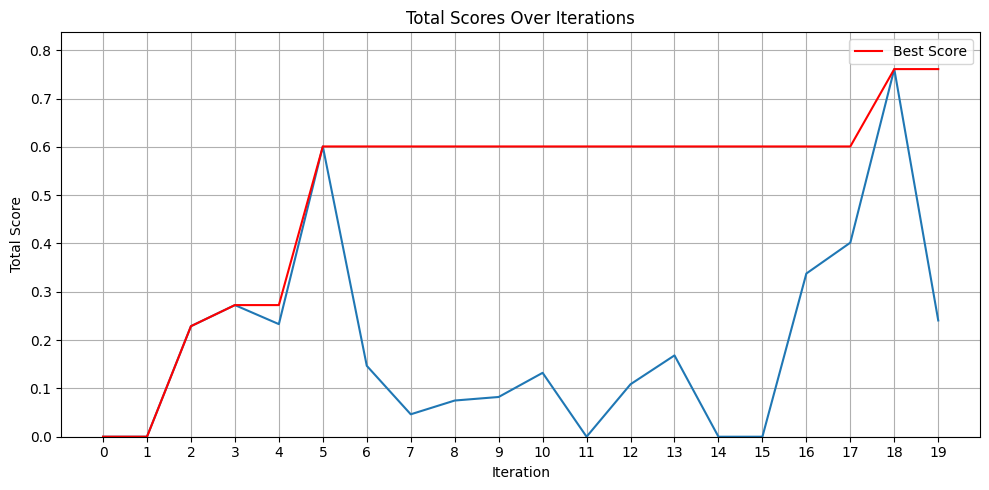
Calling the .run method executes the black-box optimization.
n_iter specifies the number of iterations of the black-box optimization. The BlackboxOptimization object calls the black-box function by itself as the optimization proceeds.
The third argument lets you specify the solver for the surrogate model, which is built as an ommx.v1.Instance. By default, ommx_pyscipopt_adapter is specified, so the surrogate model is solved with SCIP.
The return values newX, newy contain the optimization results.
new_x, newy = bb_opt.run(
    n_iter=20,
    blackbox_func=ad_campaign_blackbox_func,
)
import matplotlib.pyplot as plt

total_scores = [d["total_score"] for d in newy]
best_scores = [0]
for d in newy:
    best_scores.append(max(best_scores[-1], d["total_score"]))
best_scores = best_scores[1:]  # drop the first value

plt.figure(figsize=(10, 5))
plt.title("Total Scores Over Iterations")
plt.xlabel("Iteration")
plt.ylabel("Total Score")
plt.xticks(range(len(total_scores)))
plt.grid(True)
plt.ylim(0, max(total_scores) * 1.1)  # set the upper limit
plt.plot(total_scores)
plt.plot(best_scores, linestyle="-", color="red", label="Best Score")
plt.legend()
plt.tight_layout()
Running a single iteration#
In black-box optimization, the black-box function sometimes cannot be brought into the code as a function — for example, when each evaluation requires a real experiment.
In that case, you can run a single iteration by calling the .run method with n_iter=1.
In this case you do not need to pass a black-box function.
new_x, newy = bb_opt.run(n_iter=1)
new_x
[{'bidding_strategy': 'CPM',
  'targeting_granularity': 'age_group',
  'device_target': 'all_devices',
  'time_slot': 'weekday_daytime',
  'creative_format': 'rich_media',
  'frequency_cap': 'daily_3',
  'audience_strategy': 'interest',
  'budget_allocation': 0.1,
  'bid_amount': 500.0,
  'target_age_range': 10.0}]
newy # Empty because no black-box function was passed.
[]
Writing constraints explicitly#
This ad simulator actually has the following constraint, and the score becomes 0 when it is not satisfied:
For video ads, the budget allocation must be relatively large (at least 0.8)
Let’s set this explicitly. Add the constraint to the .problem of the BlackboxProblem.
Categorical variables are represented by binary variables with a one-hot constraint.
Since the categories of creative_format were set as ['banner', 'video', 'native', 'rich_media'], whether video is selected can be checked by whether creative_format[1] is 1 or 0.
Using this, the constraint is implemented as follows.
bb_model.problem += jm.Constraint(
    "budget constraint", 0.8 * creative_format[1] <= budget_allocation
)
Running the black-box optimization with the constraint#
bb_opt = BlackboxOptimization(bb_model)
bb_opt.setup((init_dataset, init_evals), objectives=["total_score"])

new_x, newy = bb_opt.run(
    n_iter=20,
    blackbox_func=ad_campaign_blackbox_func,
)
/tmp/ipykernel_2264/2571702980.py:1: UserWarning: This problem contains continuous or integer variables. When variables have different scales (e.g., x1 ∈ [0, 1] vs x2 ∈ [0, 1000]), surrogate model learning may become unstable, significantly affecting black-box optimization performance. It is recommended to scale all variables to similar ranges (e.g., [0, 1]). Note: You must also update the variable bounds in BlackboxProblem, not just the data.
  bb_opt = BlackboxOptimization(bb_model)
total_scores = [d["total_score"] for d in newy]
best_scores = [0]
for d in newy:
    best_scores.append(max(best_scores[-1], d["total_score"]))
best_scores = best_scores[1:]  # drop the first value

plt.figure(figsize=(10, 5))
plt.title("Total Scores Over Iterations")
plt.xlabel("Iteration")
plt.ylabel("Total Score")
plt.xticks(range(len(total_scores)))
plt.grid(True)
plt.ylim(0, max(total_scores) * 1.1)  # set the upper limit
plt.plot(total_scores)
plt.plot(best_scores, linestyle="-", color="red", label="Best Score")
plt.legend()
plt.tight_layout()
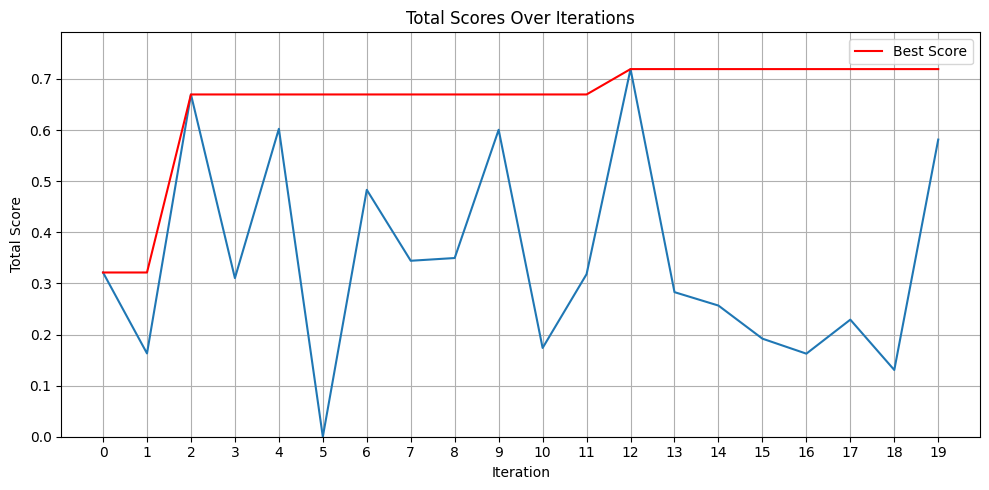
You should be able to confirm that, after adding the constraint, scores of 0 appear less often.
Even though this is black-box optimization, adding constraints that are obvious or known from domain knowledge often leads to more stable results.
Depending on the behavior of the internal algorithm, a post-processing step may take place, so even after adding a constraint, the solution can still be changed into one that violates it.